Showing posts with label LG. Show all posts
New leak suggests LG G5 will feature dual rear camera setup
LG's upcoming G5 flagship smartphone, which has been the subject of some rumors and leaks until now, will come with a dual camera set-up (16MP + 8MP) at the back.
This was revealed in a new leak, which came courtesy of a Reddit user who also shared the following image that apparently shows the device's body partially obscured by a black box.
A number of other specs were also revealed, including 5.3-inch Quad HD display, SD820 SoC with 3GB RAM, 8MP front camera, as well as a SIM and microSD slot. In addition, the leakster said that the device will also have a color spectrum and a heart rate sensor fitted in the camera assembly, as well as a fingerprint sensor embedded in the power button.
Other features that were revealed include a USB-C port, bottom firing speaker, as well as IR blaster on top. There was no word on the launch time frame though - recent reports have suggested that will happen in February.
ASUS, LG make fun of iPhone�s new smart battery case and its ridiculous hump
So, instead of sacrificing a bit of thinness for a bigger battery pack, Apple has opted to go for an unsightly hump for users to attach to their iPhones. The hump � which comes in at a whopping $99 � adds additional battery power over the internal unit.
If self-admission that their batteries aren�t large enough to satiate most power users� need isn�t enough embarrassment, ASUS and LG want to drive that home with some funny marketing. The two companies used the opportunity to ridicule Apple on Twitter, noting that their devices provide more battery life without having that ridiculous hump to show for it.
Of course, this probably won�t do much in the way of keeping Apple from selling more phones than the other two companies combined, but it sure does get a kick out of us internet folk.
LG V10 promo gets you a free 200GB micro SD card and extra battery w/ charging cradle
The LG V10 may not be flying off store shelves in Korea like LG may have hoped, but that doesn�t mean they�re not taking the necessary steps to add a little extra value to the device for its US launch. Like we saw with the LG G4 earlier this year, LG will be offering up a promo netting early adopters a handful of goodies you simply wont find offered by other manufacturers.
All you have to do is purchase the phone through Verizon, AT&T, or T-Mobile and LG will kick in a 200GB micro SD card (great for storing 4K video) along with a spare battery and charging cradle. To redeem, you�ll simply need to submit your proof of purchase to LG�s rebate site and wait in the mail for your goodies to arrive.
Keep in mind the deal is only good for a limited time, so if you were planning on picking one up, now�s as good a time as any. AT&T will have the phone available for sale on tomorrow, Oct. 27th, while T-Mobile will make it available online the very next day (Oct. 28th) and in-store October 30th.
11 things every Nexus 5X owner should do
The Nexus 5X is Google and LG�s long-overdue follow-up to the Nexus 5. Android fans loved the Nexus 5 (and still do), but it was time for an upgrade. The 5X is a worthy successor, especially with Android Marshmallow right out of the box. If you�ve never used Marshmallow before there are a few new things you�ll want to set up right away. Here are the first things you should do.
Sign into your account and use Tap & Go to restore all of your apps
One of the best recent additions to Android is one of the very first things you will see. After setting up your WiFi and signing into your Google account, you�ll be taken to the �Get your apps & data� page of the Setup Wizard. Select the �Restore from this backup� option and you�ll be presented with a list of every previously owned Android device that has been backed up to your account.
You�ll be able to see all the apps that were backed up to that device and choose the ones you wish to install on the Nexus 5X. All the apps you selected, along with your settings, will be restored to the phone. If you use the Google Now Launcher it will even restore apps to their proper place on the home screen.
Use the new USB Type-C cables, your old ones are now obsolete
The Nexus 5X comes with a shiny new USB Type-C charging cable. This is the first time we�ve seen a new connector on Android devices since the switch from mini to micro USB several years ago. There are a lot of advantages to this new standard. The cable is reversible, so it doesn�t matter how you plug it in. Charging speeds are also faster, but it�s not Quick Charge 2.0.
There are some downsides to being an early adopter to a new standard. The Nexus 5X doesn�t come with a Type-C to standard Type-A cable, which means you can�t even use your old AC adapters. You can only use the cable and adapter that comes in the box, or buy the adapter. The dozens of micro USB accessories you�ve accumulated over the years are now obsolete.
The good news is Amazon has tons of USB Type-C accessories available. Time to rebuild your stockpile.
Set up Google Now on Tap
The single most noticeable new feature of Android Marshmallow is Google Now on Tap. It�s a completely new way to interact with Google search. The Nexus 5X is one of the first devices to take advantage of this feature. Now on Tap allows Google to scan your screen and provide information based on what it finds. If your friend asks about seeing a movie in a text, Now on Tap can see the movie title and display show times.
Now on Tap is something you�ll want to use. Here�s how to set it up.
1.Open the Google app
2.Swipe in from the left and tap Settings
3.On the next page tap on Now cards
4.Make sure Now on Tap is enabled
To use Now on Tap, simply long-press the home button. You�ll see a white line trace the edge of the display, and then cards will slide up from the bottom.
2.Swipe in from the left and tap Settings
3.On the next page tap on Now cards
4.Make sure Now on Tap is enabled
To use Now on Tap, simply long-press the home button. You�ll see a white line trace the edge of the display, and then cards will slide up from the bottom.
Sign into your phone by scanning your finger
Another great new feature of Android Marshmallow is support for fingerprint scanners. On the back of the Nexus 5X you�ll notice a recessed circle underneath the camera lens. This is the fingerprint scanner. You can use it to quickly unlock your phone, pay for items with Android Pay, and even log into apps. It�s great. Here�s how to set it up.
1.Open Settings > Security
2.Tap on Nexus imprint > Add fingerprint
3.Create a backup PIN or password
4.Follow the on-screen instructions for scanning your finger
5.After you�ve added your first finger you can add more or be done
Set up Android Pay to make payments with your phone
As we mentioned above, one of the best uses for the fingerprint scanner is authenticating payments with Android Pay. When you use Android Pay at a terminal you�ll be able to simply scan your finger to approve the payment. It makes mobile payments a lot easier and faster. You�ll want to set up Android Pay so it�s ready to use.
1.Find Android Pay on your phone
2.Touch the (+) button in the bottom-right corner.
3.Touch Add a credit or debit card.
4.If you already have linked cards, choose one or touch Add another card.
5.Use the camera to capture your card info or enter it manually
Here�s the full list of accepted cards and banks. Look to use Android Pay anywhere you see the logo, online or in real life.
Manage permissions more easily
Why does the Twitter app need to know my location? Why does Facebook need to access my microphone? If these are questions you�ve asked you will love Android Marshmallow. Instead of seeing a long list of permissions when you install an app from the Play Store, you will be alerted when an app requests permission to do something. If Whatsapp wants to use your camera it will ask for your permission first.
That�s only half of the new features. It�s also possible to choose which permission you�d like to deny. The new App Info page in the Settings has a section for permissions. You can simply unselect which things you don�t want an app to have permission to do. Here�s how to do it.
1.Go to Settings > Apps
2.Tap on any app
3.Tap on Permissions from the App Info page
4.Unselect any permission you wish
Note: Not all apps will behave correctly if you disable certain permissions.
2.Tap on any app
3.Tap on Permissions from the App Info page
4.Unselect any permission you wish
Note: Not all apps will behave correctly if you disable certain permissions.
Choose default apps once and for all
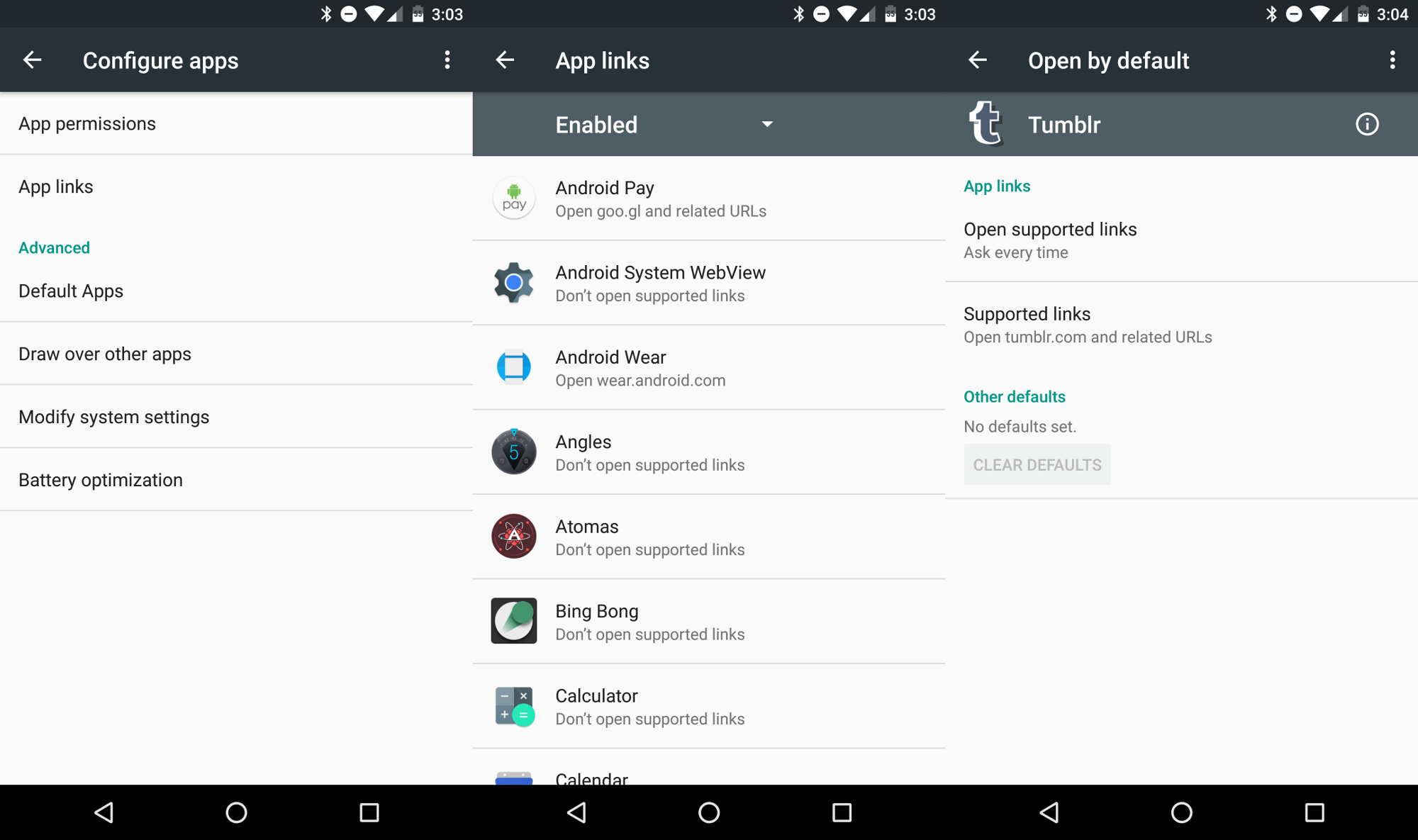
Anyone that has used Android knows how often you�re asked about the app you�d like to use to perform a task. It�s nice that we have that power, but it�s also a little annoying. A new feature called App links let you choose if you want an app to always open a certain type of link. For example, you can make Twitter links always open in the Twitter app without asking you every time. It just works.
1.Go to Settings > Apps
2.Tap the gear icon in the upper right
3.Tap on App links
4.Choose an app from the list
If the app can recognize certain links they will be listed under Supported links (the Phandroid app can open phandroid.com links). You can choose to have the supported links opened in the app, ask your permission every time, or never open in the app
Enable Google Fit to track your activity
The world of activity trackers is full of weird bracelets and dongles, but your phone is probably the best activity tracker you own. An app called Google Fit comes pre-installed on the Nexus 5X. With this app you can track your steps, activity, weight loss, and more. In order for the app to start tracking, you�ll have to first set it up.
1.Find the Google Fit app
2.Sign in with your Google account
3.Fill out your height, weight, gender, and set a personal fitness goal
That�s pretty much it. The app will run in the background and notify you when goals have been reached. All you have to do is remember to carry your phone.
Customize the Quick Toggles
Most non-Nexus devices allow you to customize the toggles found in the Quick Settings. It�s nice to be able to organize the toggles to match how you use them. Google finally added this ability in Android Marshmallow, but it can only be accessed if you know the secret method. We�ll let you in on the secret.
1.Pull down on the notification shade twice, or with two fingers
2.Long-press on the Settings gear icon in the top right for more than 5 seconds
3.Remove your finger and a toast notification will tell you System UI Tuner has been added
4.To customize the System UI go to Settings > System UI Tuner
From this screen, you�ll be able to customize the Quick Settings and choose which icons appear in the status bar. Once you successfully enable the UI Tuner you�ll notice a tiny wrench next to the gear icon in the Quick Settings. To remove the System UI Tuner from the Settings simply do the same process.
Double tap the power button to launch camera
Google and LG have talked a lot about the camera on the Nexus 5X. In the past, Nexus phones have been hampered with poor cameras in the past, but it seems they have finally caught up with everyone else in this generation. A good camera isn�t worth much if you can�t open it fast enough to take a picture. On the Nexus 5X you can double tap the power button to quickly launch the camera. Never miss a moment again!
Explore the Nexus 5X forums
If you�re already a lucky owner of the Nexus 5X, have one on the way, or plan to buy one soon, you can join the Nexus 5X forum over at Android Forums. You�ll find conversations about customization, troubleshooting problems, accessories, and much more. It�s the best place to go to ask questions and learn more about your new phone. Here are a few threads you may be interested in:
LG presented new UX4.0 + user interface for phone V10 (video)
LG announced its high-end V10 smartphone a couple of weeks ago and has just released a video showing off some of the features included in its new UX4.0+ user interface, which powers the company�s latest handset.
The video demos a number of new features packed into LG�s UX4.0+ software package, including the camera�s wide angle selfie mode and the huge range of manual camera options available in the app. The handset features a 16 megapixel rear camera with f/1.8 aperture and OIS, while there are two 5MP cameras on the front which allow for a 120 degree wide field of view.
If audio is more your thing, LG�s Hi-Fi Audio Experience software suite and support for higher resolution audio formats on its 32-bit DAC might catch your interest. Furthermore, busy people out there may find the software�s organization features and second screen, which can be used to house your most frequency tasks, rather convenient, according to the video.
(source)
Don�t plan on using your old chargers with the Nexus 5X, it only comes with Type-C to Type-C cable
We know, USB Type-C is the future and we�re happy to see Google going all gung-ho over making it the new standard. Both upcoming Nexus devices will have USB Type-C ports which allow you to insert the USB cable any which way you�d like. There�s only 1, small, teensy little problem: the Nexus 5X only comes with a USB Type-C to USB Type-C cable. Well, that sucks.
What does this mean for you?
Well, that means you wont be able to use the included cable in your existing USB chargers, car charger, or even plug it into your computer. That is, unless you�re sporting one of those fancy new MacBooks Apple recently released. On a related note, Huawei seems to have no problem shipping customers of the Nexus 6P an extra cable, one that connects to all the old devices you�ve been using all these years (Type-C to Type-A).
The $20 Solution
So, if you were planning on picking up the Nexus 5X (we can�t help but think there are better options), you may want to check out this 4-pack of Type-C to Type-A cables for $20 from Amazon.
LG officially announces the LG V10 with secondary display and dual front-facing cameras (VIDEO)
Ticker Display Done Right?
Thankfully it doesn�t appear the LG V10 will fall victim to the same circumstances that doomed that phone (lackluster specs and lack of availability). The secondary display can be used for quick looks at weather, time, date and battery status while the display is off. While it�s on, it acts as a dedicated apps launcher, and during video playback or games it�ll notify you when a call or text comes in so as to not interrupt you with a popup notification on the main display.
Cameras Galore
Another neat feature we haven�t seen on my other phones in the past? Dual front-facing cameras. We�ve seen that on the rear of some phones, but not the front. The purpose of the two cameras (5 megapixels each) is to provide both the standard 80-degree view we used to have, as well as the 120-degree wide angle view that has become standard in most other phones. To achieve this, the software uses an algorithm that takes two separate images and stitches them together to help achieve whichever exact angle you want. Neato.
That said, there is still a lot to get excited for with the rear camera, which is a 16MP shooter similar to the one found in the LG G4. LG has included manual mode for video recording, which is another first for a smartphone. It allows you to change aspect ratios (16:9 or 21:9 cinematic), resolutions (HD, FHD or UHD) and more:
Steady Record: utilizes electronic image stabilization (EIS) optimized for recording video to neutralize shake, helping to capture sharper video footage when in motion
Snap Video: create one video by combining many shorter videos
15 Sec. Auto Edit: create a short video highlight clip by automatically eliminating blurred frames and static scenes
Quick Video Editor: easily trim or change the frame rate and add after-effects, such as colors and background music
Quick Share: when finished recording, a pop-up appears on the display showing options of popular social networks to make video sharing even easier and faster
Audio Monitor: adjust the sensitivity of the three microphones during video recording and directly monitor and control audio input, including directional recording capability to highlight sound from one particular location
Wind Noise Filter: eliminate external wind noise for high-quality sound when shooting video outdoors
LG V10 Specs
The rest of the device sounds quite solid. 4GB of RAM, Snapdragon 808, 64GB of storage, 3,000mAh battery. Even a microSD slot � it�s all there. Take a look at the full list:
Chipset: Qualcomm� Snapdragon� 808 Processor
Display: Main) 5.7-inch QHD IPS Quantum Display (2560 x 1440 / 513ppi)
Secondary) 2.1-inch IPS Quantum Display (160 x 1040 / 513ppi)
Memory: 4GB LPDDR3 RAM / 64GB eMMC ROM / microSD (up to 2TB)
Camera: Rear) 16MP with F1.8 Aperture / OIS 2.0
Front) 5MP Dual Lens (80o Standard Angle / 120o Wide Angle)
Battery: 3,000mAh (removable)
OS: Android 5.1.1 Lollipop
Size: 6 x 79.3 x 8.6mm
Weight: 192g
Network: LTE-A Cat. 6
Connectivity: Wi-Fi 802.11 a, b, g, n, ac / Bluetooth 4.1 / NFC / USB 2.0
Colors: Space Black / Luxe White / Modern Beige / Ocean Blue / Opal Blue
Sounds like a flagship to us.
Availability
LG didn�t have much pricing info to dish out, but we do know where it�ll be headed. South Korea will get it first, naturally, but we�ll also see it in the United States, China and key countries in Asia, Latin America and the Middle East by year�s end. LG says more markets will be added to the list in due time, so we�ll have to wait for further announcements to see which other areas will get it.
Nexus 5X is now official with 5.2-inch display and Nexus Imprint (VIDEO)
After the countless leaks and rumors, the Nexus 5X is finally official. LG�s long-awaited successor to the Nexus 5 improves upon the fan favorite from two years ago. The 5X is slightly cheaper and less powerful compared to the Nexus 6P.
The Nexus 5X has a 5.2-inch 1080p display. It�s powered by the familiar Qualcomm Snapdragon 808 processor. On the back is a 12.3MP camera that Google says is especially good at indoor photos. The back is also home to a fingerprint sensor, which is used for a feature called �Nexus Imprint.� It�s basically the way you�d expect a fingerprint sensor to work, but Google says it gets better over time.
The Nexus 5X will be available for pre-order today from the Google Store. It will start at $379. You�ll be able to get your hands on it later in October, and it will work on all major US carriers (including Project Fi). It will also come with 90 days of Google Play Music All Access, a $50 Google Play credit, and optional Nexus Protect protection plan.
iPhone 6S plus still can't beat the Galaxy S6 edge plus or LG G4 in a camera shootout (VIDEO)
Camera shootout: iPhone 6S vs. Galaxy S6 vs. LG G4 - fantastic video
Unless you�ve been living under a rock (or consciously skip past any Apple related news), you�d know that today is iPhone Launch Day. With the Apple iPhone 6S and 6S Plus officially hitting stores today, you�ll be up to your ears in reviews, comparisons, and drop tests. The internet is full of them right now. Given that Apple made a big deal about the new camera tech inside the iPhone 6S (it now comes with a higher resolution 12MP camera among other improvements), sites are putting Apple�s claims to the test with head-to-head battles against some of Android�s greatest.
In years past, this would have ended in a massacre, with the iPhone always winning top honors. But things have changed this year. Android OEMs have finally stepped up (with the exception of HTC, of course), creating a blend of camera software and hardware working together to deliver superior results than even Apple�s long standing iPhone line. With the new iPhone, you�re probably wondering if Apple was finally able to reclaim their crown, or will it continue fall short when compared against heavyweights like the Samsung Galaxy S6 and LG G4? In The Verge�s latest video, they took all 3 of these aforementioned phones out on the town, comparing photo quality in a dark room and discussing the results.
We know, typically The Verge�s blatant Apple bias creeps into reviews like this, but this one seemed a little more objective than most (despite them calling it a tie when it seemed to us the Galaxy S6 was the clear winner in most cases). Be all that as it may, their final ruling was that all of them are great in their own respects, it just comes down to personal preference on which output you prefer. Maybe they just didn�t want to believe that their $750 investment didn�t quite live up to Apple�s promises. We�ll let you decide for yourself in the video down below.
LG releases a video teaser for its upcoming V10 phablet
LG today released a new teaser video on its YouTube channel for its upcoming V10 phablet with a secondary �ticker� display.
Unsurprisingly, the teaser focusses on the phablet�s secondary ticker display, giving us our first glimpse at it �in action�. The secondary display of the phablet could be used to display app shortcuts as well as notifications, as seen in the leaked render posted by leakster @evleaks yesterday. We�re guessing the secondary ticker display could function in the same way as the side edge on the Galaxy S6 Edge+ or the Galaxy Note Edge.
The V10 phablet is set to go official on October 1st at LG�s media event in New York City. Most of the phablet�s specs have been leaked already, thanks to the TENAA listing. It will feature a 5.7-inch 1440 x 2560 Quad HD display, Snapdragon 808 six-core SoC, 3GB RAM, 16MP rear camera, 64GB expandable memory, dual selfie cameras, and a fingerprint scanner embedded on the power key.
Rumors: LG G5 next year comes with a Snapdragon 820 and Sony 20 MP camera
An anonymous source, who claims to have inside information, is now shedding light on two of the most important bits of the potential G5's hardware. The camera, for one, will use a new Sony-made 20MP sensor with a half-inch diagonal - one of the largest around.
For example the G4 has a 1/2.6" diagonal, this year's Samsung Galaxies (S6/S6 edge/S6 edge+/Note5) and the iPhone 6/6 Plus use a smaller 1/3" chip, and Sony's own Xperia Z5 series boast a 1/2.3" imager. All those are of course miniature compared to the 1/1.2" sensor of the Nokia PureView 808, but iconic or not, the 808 is ancient history. What's even more interesting though, is that the new sensor will only be provided to LG, and won't be used by other manufacturers.
The source also states that the upcoming LG flagship will be powered by the Snapdragon 820 chip. That's an easy assumption to make without insider information, but reports have been surfacing that LG is in development of its own top-end chipset. Apparently though, LG will stay in Qualcomm's camp for yet another generation.
The source has been deemed trustworthy, but even if the above is correct at the time of writing, there's no less than 6 months before we get to see the LG G5, so bear in mind that things may change.
LG's intriguing V10 smartphone (with two displays) shows up in a new photo
Most likely, this secondary display is touch-sensitive, though for now we can't confirm this.
On the left side of the ticker display, we can see what appear to be two front-facing cameras. Overall, the LG V10 looks intriguing.
The main screen of the new handset is supposed to be a 5.7-inch one with 1440 x 2560 pixels (Quad HD). The V10 should also feature a six-core Snapdragon 808 processor, 3 GB of RAM, 64 GB of expandable storage space, and a 16 MP rear camera with laser auto focus. Like all other recently released LG handsets, the V10 has its power and volume buttons on the back.
The LG V10 could be announced next week, on October 1, during an event held in New York City.
Published new photographs LG Nexus 5 phone
The bulk of leaks we've been seeing recently has revolved around Google's upcoming device launches, the pair of them. The LG Nexus 5 and the Samsung Nexus 6 take turns appearing in the hands of insiders, and this time it's the former.
The angle here is that the smaller Nexus will be available in the third Mint color option, in addition to the already seen White and Black. The picture shows a very gentle tint and if it were not for the source to testify that it is indeed mint, they could have just assumed it's white, and the camera messed up the white balance.
Not much else gets revealed this time around and we're left with previously rumored specs, which point to a 5.2-inch FullHD display, Snapdragon 808 chipset, 3GB of RAM and a 12.3MP/5MP camera combo. Pioneering Android 6.0 Marshmallow, the LG Nexus 5 (2015), or maybe Nexus 5X, is rumored to be unveiled on September 29 alongside the higher-end Huawei Nexus 6 (2015, perhaps).
Subscribe to:
Posts (Atom)